> ## Documentation Index
> Fetch the complete documentation index at: https://docs.celum.io/llms.txt
> Use this file to discover all available pages before exploring further.
# BGP & Egress
> Monitor BGP sessions, reconcile the advertise table against what routers actually see, and manage egress — candidate nodes, HA, and SNAT policies.
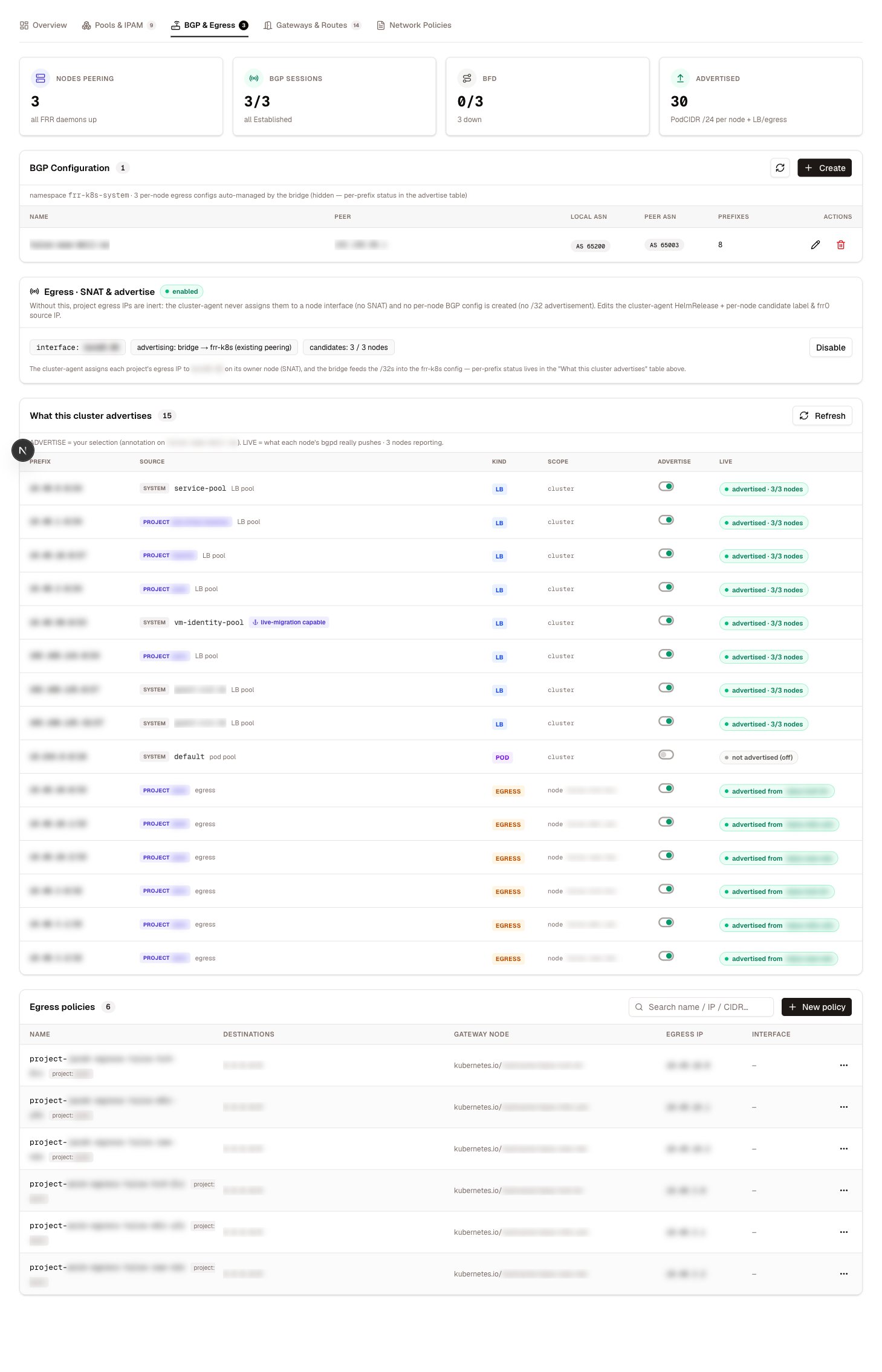
The **BGP & Egress** tab is where the supervisor's routing meets the physical fabric: which prefixes the cluster tells its BGP peers about, whether each node's sessions are actually up, and how outbound traffic leaves through egress gateways.
 ## BGP engines
The view adapts to the BGP engine the supervisor runs — the engine pill in the page header tells you which:
| Engine | What it is |
| ------------------------ | -------------------------------------------------------------------- |
| FRR-K8s | FRR managed through `FRRConfiguration` objects — the current default |
| Legacy FRR | The earlier FRR integration driven by the cluster agent |
| Cilium BGP control plane | Cilium's built-in BGP speaker, configured through Cilium CRDs |
Whichever engine is active, the same two surfaces render: per-node sessions and the advertise table.
## Session monitoring
The session table shows one row per node and peer: peer address, local and peer ASN, session state and uptime, and the counts of advertised and received routes. A healthy row looks like this:
| Node | Peer | Local AS | Peer AS | State | Uptime | Pfx sent | Pfx received |
| -------- | ---------- | -------- | ------- | ----------- | -------- | -------- | ------------ |
| `node-1` | `10.0.0.1` | 65200 | 65000 | Established | 1d12h43m | 12 | 3 |
Anything other than `Established` means that node is not exchanging routes. A node whose session is down stops carrying traffic for advertised prefixes — with more than one node peering, the fabric routes around it; with one, the prefix goes dark. Expanding a node also shows the routes it advertises and receives, with next hop and best-path markers.
## The advertise table
The advertise machinery has several layers — candidate prefixes from live objects, the operator's selection, the engine's expansion, and what each node's BGP daemon actually pushes. The advertise table flattens all of it into **one row per prefix**:
| Column | Meaning |
| --------- | ----------------------------------------------------------------------------- |
| Prefix | The advertised CIDR |
| Source | Where it comes from — a project's LoadBalancer pool, a pod pool, an egress IP |
| Kind | `pod`, `lb`, or `egress` |
| Scope | `cluster` (advertised by every node) or a single node |
| Advertise | The operator's intent — a toggle per row |
| Live | What the BGP daemon is actually doing |
The **Live** column is the drift detector:
| State | Meaning |
| ------------ | -------------------------------------------------------------- |
| `advertised` | Selected and present in the BGP daemon everywhere it should be |
| `partial` | Selected, but only some nodes are advertising it |
| `missing` | Selected but absent — bridge lag, or something is wrong |
| `off` | Not selected and not advertised — consistent |
| `drift` | **Not** selected but still being advertised |
Treat `drift` as a real finding, not noise. A prefix the fabric can still reach after you turned it off means intent and reality have diverged — the row's diagnostic explains where.
Two rows from a healthy-but-imperfect three-node supervisor:
| Prefix | Source | Kind | Scope | Advertise | Live |
| -------------- | --------------------------------------------------- | ---- | ------- | --------- | ---------------------- |
| `10.0.20.0/24` | system · LB pool `service-pool` (platform services) | `lb` | cluster | On | advertised · 3/3 nodes |
| `10.0.30.0/29` | project `shop` · LB pool | `lb` | cluster | On | partial · 2/3 nodes |
The second row is what `partial` looks like in practice: the prefix is selected and two nodes push it, but the third does not — usually that node's BGP session is down, or the engine has not converged yet. The session table above tells you which.
Flipping a row's toggle updates the operator selection; the engine converges and the Live column confirms it. Project-sourced rows follow the owning project's own [advertise toggles](/networking/project-networking#bgp-advertise-toggles) — change them on the project, and the rows here follow. The Overview tab shows a snapshot of this same table.
## Egress
Egress is the outbound mirror of gateways: instead of traffic coming in through a shared address, workloads leave the cluster **through designated gateway nodes with a dedicated source IP** (SNAT). Use it when an upstream firewall allow-lists by source address, or when compliance requires attributable egress. This tab is the single home for all three egress surfaces.
### Candidate nodes
Egress gateways are **label-driven**: a node label marks which nodes are eligible to carry egress IPs, and the candidate-nodes card manages that label declaratively — tick the nodes that should be candidates, and the platform labels exactly those. The same candidate set drives the per-node spread preview in project creation, the agent that places egress IPs on nodes, and the gateway selection in egress policies, so there is one source of truth.
### Egress HA
With a single candidate node, that node is a single point of failure for every egress IP it carries. The **Egress HA** section configures BGP-backed failover for the egress path:
* **Egress interface** — the interface egress IPs are placed on, typically a VLAN subinterface of the nodes' bond.
* **Local ASN and AS-path prepend count** — how the egress speakers present themselves to the upstream, and how strongly standby paths are depreferenced.
* **Upstream peers** — the routers the egress nodes peer with: address, remote ASN, optional eBGP multihop and BFD per peer.
* **BFD timers** — shared receive/transmit intervals and multiplier. At 50 ms / 50 ms with a multiplier of 3, a dead node is detected in roughly 150 ms — the egress IP moves before applications notice.
* **Per-node settings** — the candidate toggle and the BGP source address each node peers from.
The section also reports how many egress addresses are currently allocated across the candidate set, so you can see the blast radius of a node failure at a glance.
Egress HA configures the platform's own BGP speaker on the candidate nodes — it is independent of the cluster-wide BGP engine settings above, because failover needs per-node advertise and withdraw that a cluster-scoped configuration cannot express.
### Egress policies
The policy table lists every `CiliumEgressGatewayPolicy` and supports full CRUD. A policy says: traffic from *these pods* to *these destinations* leaves via *this gateway node* with *this source IP*.
| Field | Meaning |
| --------------------- | -------------------------------------------------------------------------------- |
| Destination CIDRs | Which traffic to capture — `0.0.0.0/0` for all external traffic |
| Excluded CIDRs | Exceptions, for example `10.0.0.0/8` to leave internal traffic alone |
| Pod selector | Labels matching the source pods |
| Namespace | Restricts the policy to one namespace |
| Gateway node selector | Which node performs the SNAT — required |
| Egress IP | The SNAT source address — must already exist on an interface of the gateway node |
| Interface | Alternative to an explicit IP: SNAT from this NIC's address |
A sanitized policy, as the table shows it:
```yaml theme={null}
name: shop-egress
destinationCIDRs: ["0.0.0.0/0"]
excludedCIDRs: ["10.0.0.0/8"]
selectors:
- podSelector:
matchLabels:
io.kubernetes.pod.namespace: proj-shop
egressGateway:
nodeSelector:
matchLabels:
kubernetes.io/hostname: node-2
egressIP: 10.0.8.5
```
Behavior worth knowing:
* **Egress IP and Interface are mutually exclusive.** With neither set, the default-route interface's address is used.
* In-cluster destinations are automatically excluded, even when they fall inside the destination CIDRs.
* If the node selector matches several nodes, the first in lexical order wins — for deterministic placement, use the candidate machinery rather than broad selectors.
Policies generated from a [project's egress configuration](/networking/project-networking) appear in the table but are **read-only** there — they carry the owning project in their labels and follow the project lifecycle. A project spreading several egress IPs across gateway nodes materializes as one such policy per node/IP pair. Edit the project, not the policy.
Each project's egress IP, and the node currently carrying it, is also visible in the [allocation views](/networking/pools-and-ipam#allocation-views) on the Pools & IPAM tab.
## Permissions
| Task | Action |
| ----------------------------------------------------------------------- | ----------------- |
| Read sessions, advertise table, egress state | `cilium:GetState` |
| Toggle advertisements, edit BGP config, manage candidates, HA, policies | `cilium:Apply` |
Both are scoped to `krn:vks:supervisor::cilium:*`.
## Related
The pools whose prefixes populate the advertise table.
The per-tenant intent behind read-only policies and project advertise rows.
The inbound counterpart to egress.
The engine model and the Overview tab's advertise snapshot.
## BGP engines
The view adapts to the BGP engine the supervisor runs — the engine pill in the page header tells you which:
| Engine | What it is |
| ------------------------ | -------------------------------------------------------------------- |
| FRR-K8s | FRR managed through `FRRConfiguration` objects — the current default |
| Legacy FRR | The earlier FRR integration driven by the cluster agent |
| Cilium BGP control plane | Cilium's built-in BGP speaker, configured through Cilium CRDs |
Whichever engine is active, the same two surfaces render: per-node sessions and the advertise table.
## Session monitoring
The session table shows one row per node and peer: peer address, local and peer ASN, session state and uptime, and the counts of advertised and received routes. A healthy row looks like this:
| Node | Peer | Local AS | Peer AS | State | Uptime | Pfx sent | Pfx received |
| -------- | ---------- | -------- | ------- | ----------- | -------- | -------- | ------------ |
| `node-1` | `10.0.0.1` | 65200 | 65000 | Established | 1d12h43m | 12 | 3 |
Anything other than `Established` means that node is not exchanging routes. A node whose session is down stops carrying traffic for advertised prefixes — with more than one node peering, the fabric routes around it; with one, the prefix goes dark. Expanding a node also shows the routes it advertises and receives, with next hop and best-path markers.
## The advertise table
The advertise machinery has several layers — candidate prefixes from live objects, the operator's selection, the engine's expansion, and what each node's BGP daemon actually pushes. The advertise table flattens all of it into **one row per prefix**:
| Column | Meaning |
| --------- | ----------------------------------------------------------------------------- |
| Prefix | The advertised CIDR |
| Source | Where it comes from — a project's LoadBalancer pool, a pod pool, an egress IP |
| Kind | `pod`, `lb`, or `egress` |
| Scope | `cluster` (advertised by every node) or a single node |
| Advertise | The operator's intent — a toggle per row |
| Live | What the BGP daemon is actually doing |
The **Live** column is the drift detector:
| State | Meaning |
| ------------ | -------------------------------------------------------------- |
| `advertised` | Selected and present in the BGP daemon everywhere it should be |
| `partial` | Selected, but only some nodes are advertising it |
| `missing` | Selected but absent — bridge lag, or something is wrong |
| `off` | Not selected and not advertised — consistent |
| `drift` | **Not** selected but still being advertised |
Treat `drift` as a real finding, not noise. A prefix the fabric can still reach after you turned it off means intent and reality have diverged — the row's diagnostic explains where.
Two rows from a healthy-but-imperfect three-node supervisor:
| Prefix | Source | Kind | Scope | Advertise | Live |
| -------------- | --------------------------------------------------- | ---- | ------- | --------- | ---------------------- |
| `10.0.20.0/24` | system · LB pool `service-pool` (platform services) | `lb` | cluster | On | advertised · 3/3 nodes |
| `10.0.30.0/29` | project `shop` · LB pool | `lb` | cluster | On | partial · 2/3 nodes |
The second row is what `partial` looks like in practice: the prefix is selected and two nodes push it, but the third does not — usually that node's BGP session is down, or the engine has not converged yet. The session table above tells you which.
Flipping a row's toggle updates the operator selection; the engine converges and the Live column confirms it. Project-sourced rows follow the owning project's own [advertise toggles](/networking/project-networking#bgp-advertise-toggles) — change them on the project, and the rows here follow. The Overview tab shows a snapshot of this same table.
## Egress
Egress is the outbound mirror of gateways: instead of traffic coming in through a shared address, workloads leave the cluster **through designated gateway nodes with a dedicated source IP** (SNAT). Use it when an upstream firewall allow-lists by source address, or when compliance requires attributable egress. This tab is the single home for all three egress surfaces.
### Candidate nodes
Egress gateways are **label-driven**: a node label marks which nodes are eligible to carry egress IPs, and the candidate-nodes card manages that label declaratively — tick the nodes that should be candidates, and the platform labels exactly those. The same candidate set drives the per-node spread preview in project creation, the agent that places egress IPs on nodes, and the gateway selection in egress policies, so there is one source of truth.
### Egress HA
With a single candidate node, that node is a single point of failure for every egress IP it carries. The **Egress HA** section configures BGP-backed failover for the egress path:
* **Egress interface** — the interface egress IPs are placed on, typically a VLAN subinterface of the nodes' bond.
* **Local ASN and AS-path prepend count** — how the egress speakers present themselves to the upstream, and how strongly standby paths are depreferenced.
* **Upstream peers** — the routers the egress nodes peer with: address, remote ASN, optional eBGP multihop and BFD per peer.
* **BFD timers** — shared receive/transmit intervals and multiplier. At 50 ms / 50 ms with a multiplier of 3, a dead node is detected in roughly 150 ms — the egress IP moves before applications notice.
* **Per-node settings** — the candidate toggle and the BGP source address each node peers from.
The section also reports how many egress addresses are currently allocated across the candidate set, so you can see the blast radius of a node failure at a glance.
Egress HA configures the platform's own BGP speaker on the candidate nodes — it is independent of the cluster-wide BGP engine settings above, because failover needs per-node advertise and withdraw that a cluster-scoped configuration cannot express.
### Egress policies
The policy table lists every `CiliumEgressGatewayPolicy` and supports full CRUD. A policy says: traffic from *these pods* to *these destinations* leaves via *this gateway node* with *this source IP*.
| Field | Meaning |
| --------------------- | -------------------------------------------------------------------------------- |
| Destination CIDRs | Which traffic to capture — `0.0.0.0/0` for all external traffic |
| Excluded CIDRs | Exceptions, for example `10.0.0.0/8` to leave internal traffic alone |
| Pod selector | Labels matching the source pods |
| Namespace | Restricts the policy to one namespace |
| Gateway node selector | Which node performs the SNAT — required |
| Egress IP | The SNAT source address — must already exist on an interface of the gateway node |
| Interface | Alternative to an explicit IP: SNAT from this NIC's address |
A sanitized policy, as the table shows it:
```yaml theme={null}
name: shop-egress
destinationCIDRs: ["0.0.0.0/0"]
excludedCIDRs: ["10.0.0.0/8"]
selectors:
- podSelector:
matchLabels:
io.kubernetes.pod.namespace: proj-shop
egressGateway:
nodeSelector:
matchLabels:
kubernetes.io/hostname: node-2
egressIP: 10.0.8.5
```
Behavior worth knowing:
* **Egress IP and Interface are mutually exclusive.** With neither set, the default-route interface's address is used.
* In-cluster destinations are automatically excluded, even when they fall inside the destination CIDRs.
* If the node selector matches several nodes, the first in lexical order wins — for deterministic placement, use the candidate machinery rather than broad selectors.
Policies generated from a [project's egress configuration](/networking/project-networking) appear in the table but are **read-only** there — they carry the owning project in their labels and follow the project lifecycle. A project spreading several egress IPs across gateway nodes materializes as one such policy per node/IP pair. Edit the project, not the policy.
Each project's egress IP, and the node currently carrying it, is also visible in the [allocation views](/networking/pools-and-ipam#allocation-views) on the Pools & IPAM tab.
## Permissions
| Task | Action |
| ----------------------------------------------------------------------- | ----------------- |
| Read sessions, advertise table, egress state | `cilium:GetState` |
| Toggle advertisements, edit BGP config, manage candidates, HA, policies | `cilium:Apply` |
Both are scoped to `krn:vks:supervisor::cilium:*`.
## Related
The pools whose prefixes populate the advertise table.
The per-tenant intent behind read-only policies and project advertise rows.
The inbound counterpart to egress.
The engine model and the Overview tab's advertise snapshot.