> ## Documentation Index
> Fetch the complete documentation index at: https://docs.celum.io/llms.txt
> Use this file to discover all available pages before exploring further.
# Gateways & Routes
> Run shared Gateways with a single LoadBalancer address, edit listeners and TLS, switch datapath modes, and publish services and tenant APIs.
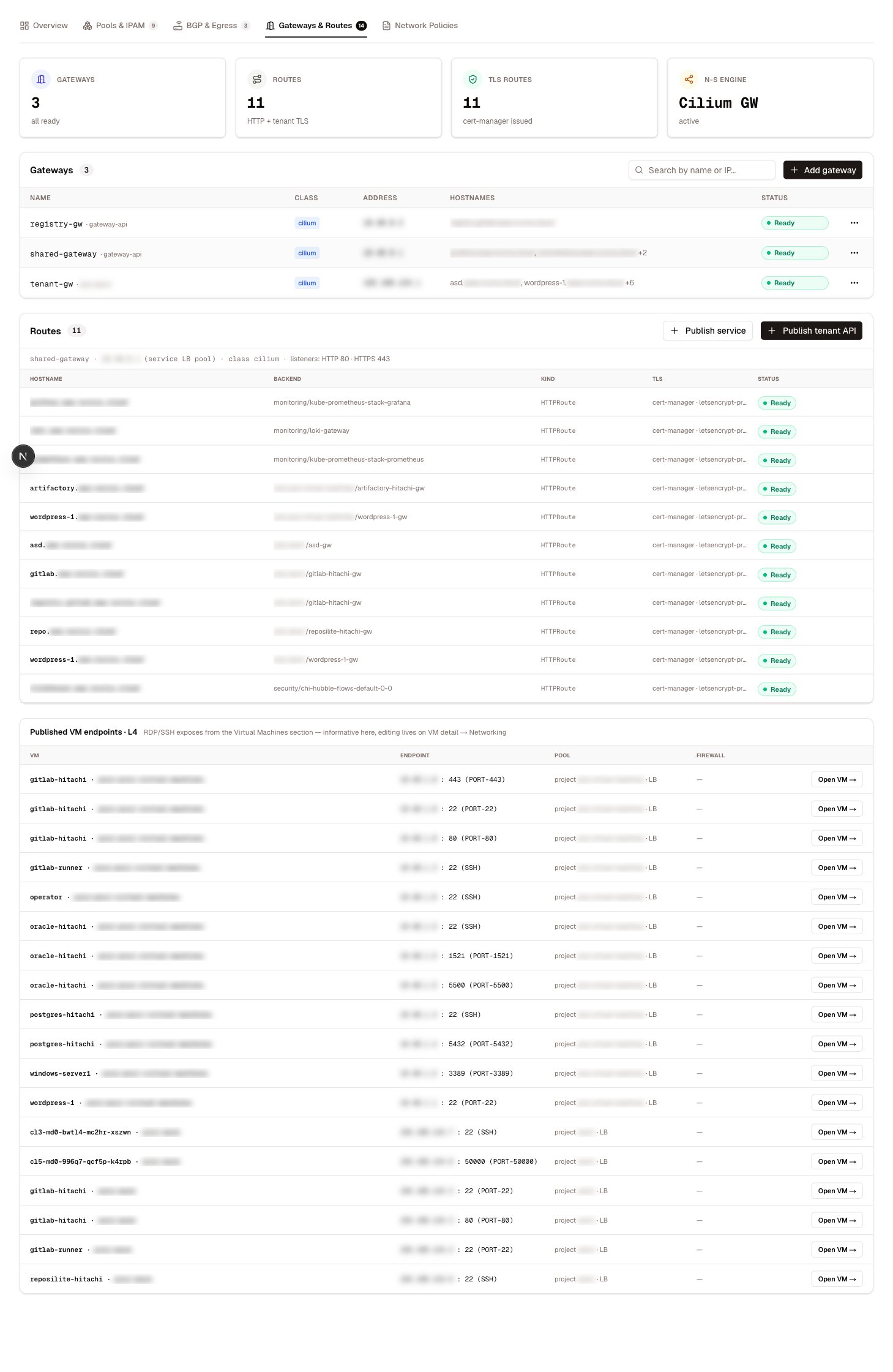
The **Gateways & Routes** tab manages the north-south path: Gateway API objects, their listeners and certificates, and the routes that publish workloads through them. Which controller serves them — Envoy Gateway or Cilium Gateway API — is shown by the north-south engine pill in the page header. If the pill flags a **conflict**, both stacks' CRDs are installed at once; resolve that before creating gateways, or two controllers will fight over the same objects.
 ## The shared gateway pattern
Celum's ingress model is built on **one Gateway, many namespaces**. A shared Gateway holds a single LoadBalancer address; every listener on it allows routes from all namespaces, so an HTTPRoute anywhere in the cluster can attach to it cross-namespace. cert-manager's Gateway API integration issues TLS certificates straight from the Gateway's annotations.
```mermaid theme={null}
flowchart LR
I[Internet] --> GW[Shared Gateway
## The shared gateway pattern
Celum's ingress model is built on **one Gateway, many namespaces**. A shared Gateway holds a single LoadBalancer address; every listener on it allows routes from all namespaces, so an HTTPRoute anywhere in the cluster can attach to it cross-namespace. cert-manager's Gateway API integration issues TLS certificates straight from the Gateway's annotations.
```mermaid theme={null}
flowchart LR
I[Internet] --> GW[Shared Gateway
one LB address]
GW --> R1[HTTPRoute · namespace a]
GW --> R2[HTTPRoute · namespace b]
GW --> R3[TLSRoute · tenant API]
```
The result: services and tenant APIs are published without consuming a LoadBalancer address each, and certificates renew without anyone touching a Secret.
## The Gateways table
Each row shows the gateway's class chip, its address, the hostnames it serves, and its ready state. Gateways created by Celum are fully editable; gateways created outside it are listed read-only — edit those through their own tooling.
### Create a gateway
**Add gateway** asks for a name, a namespace, and optionally a **requested IP** — a specific address from a LoadBalancer pool instead of whatever the pool hands out next. You can change the address later from the row's actions. With no listeners specified, the gateway starts with a single HTTP listener on port 80; add more with the listener editor.
## Listeners
The listener editor manages the gateway's listeners — each is a name, protocol, port, and optional hostname:
Plain HTTP. Typically kept on port 80 for the automatic HTTPS redirect that route publication creates.
TLS terminated at the gateway. The certificate comes from one of two places:
* **An existing Secret** — pick any TLS Secret in the gateway's namespace.
* **A cert-manager ClusterIssuer** — name the issuer and a hostname, and cert-manager issues and renews the certificate into an auto-named Secret. This is the zero-maintenance path.
Issuer mode requires a hostname, because certificates are issued per hostname.
TLS is **not** terminated — encrypted traffic is forwarded to the backend based on the SNI hostname. This is how tenant Kubernetes APIs are published, since their clients must see the API server's own certificate.
One ClusterIssuer per gateway: the issuer rides a Gateway-level annotation, so all issuer-mode listeners on a gateway share it.
Listener names starting with `tls-` are reserved for tenant-API publications. The editor refuses them, and editing listeners never touches the reserved ones — so an operator edit can never silently unpublish a tenant API.
## Datapath modes
On Envoy-class gateways, each gateway can choose how its proxy runs — the switch actually reconfigures the underlying Envoy proxy deployment:
| Mode | How it runs | Choose it when |
| --------- | ------------------------- | ---------------------------------------------------------------------------------- |
| Cluster | A shared proxy Deployment | The default — fine for most gateways |
| Daemonset | One proxy pod per node | High-traffic gateways that should scale with the node count and skip the extra hop |
Switching mode rolls the proxy; expect a brief connection blip on that gateway.
## Routes
One table lists every route — HTTP and TLS — with its hostname, backend, parent gateway, and whether the gateway controller **accepted** it. An unaccepted route serves nothing; the row carries the controller's message explaining why.
### Publish a service
**Publish service** creates an HTTPRoute through a shared gateway:
Choose the namespace and Service to publish.
Celum suggests a hostname from the supervisor's configured domain — for example `myservice.`.
Choose which shared gateway carries the route and, for HTTPS, the ClusterIssuer for its certificate.
An HTTP-to-HTTPS redirect (301) is created alongside the route automatically, so the plain-HTTP hostname never serves content.
### Publish a tenant cluster's API
**Publish tenant API** exposes a tenant cluster's Kubernetes API through the shared gateway using TLS passthrough:
* A passthrough listener for the chosen hostname is appended to the gateway (with the reserved `tls-` name prefix).
* A TLSRoute forwards matching SNI traffic to the tenant's API server Service.
* The hostname is appended to the tenant API server certificate's SANs, so `kubectl` trusts the published endpoint.
Unpublishing removes the route and its listener again. The table shows each published API's accepted state — if it stays unaccepted with no controller status, the gateway controller may not watch TLSRoutes at all (Cilium's Gateway API needs its alpha feature set for that).
Individual VM ports can also be published through a gateway. That flow lives with the VM — see [VM networking](/vms/networking#publishing-through-a-gateway).
## Permissions
| Task | Action |
| ----------------------------------------------------------------- | ---------------- |
| List gateways, listeners, TLS secrets, routes | `gateway:List` |
| Create or update a gateway, listener, datapath, or route; publish | `gateway:Create` |
| Delete a gateway or route; unpublish | `gateway:Delete` |
All are scoped to `krn:vks:supervisor::gateway:*`.
## Related
Publishing a single VM's ports — LoadBalancer or gateway.
Where a gateway's LoadBalancer address comes from.
How the gateway's address is advertised to the fabric.
The north-south engine and the rest of the model.