
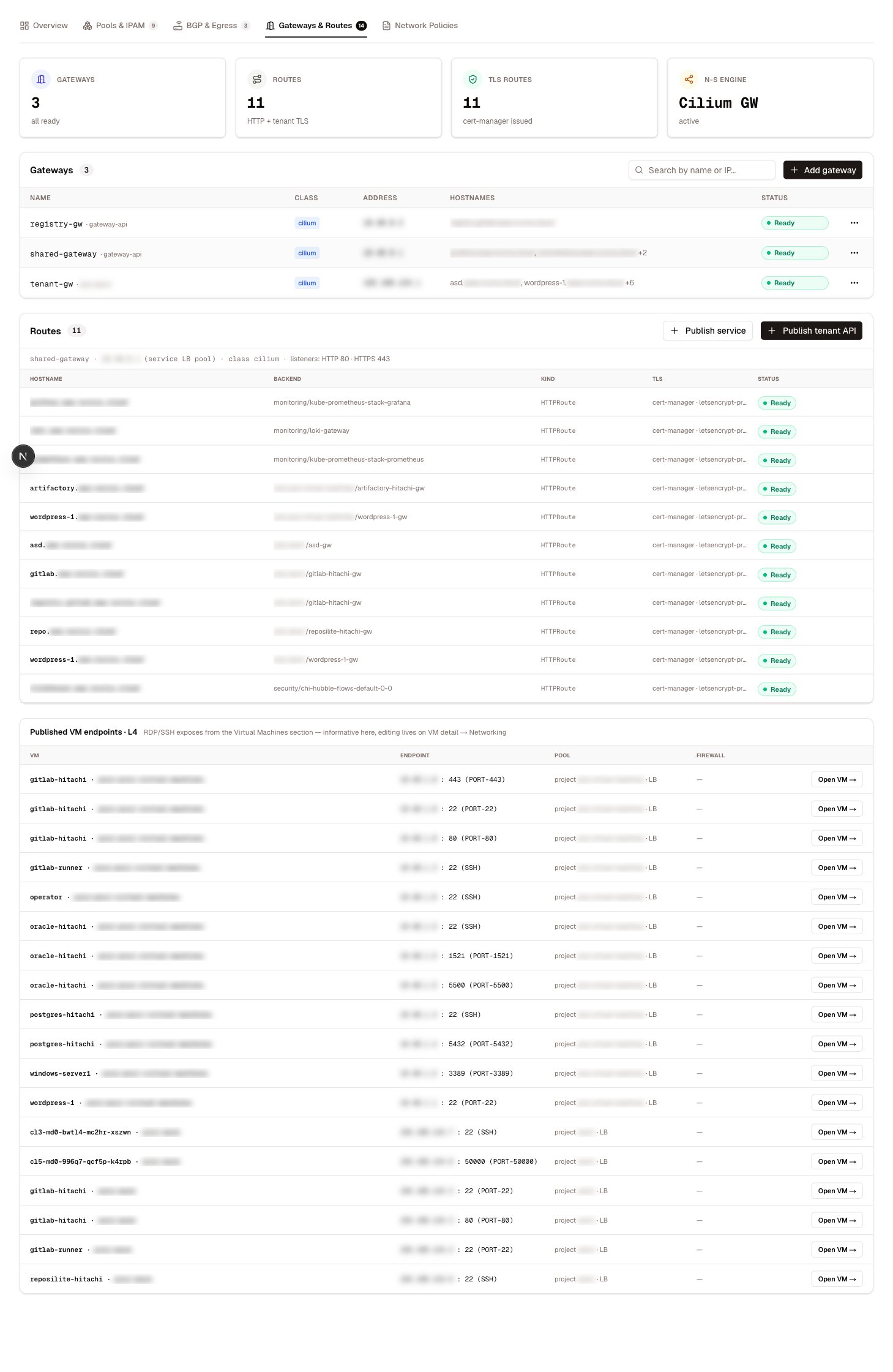
The shared gateway pattern
Celum’s ingress model is built on one Gateway, many namespaces. A shared Gateway holds a single LoadBalancer address; every listener on it allows routes from all namespaces, so an HTTPRoute anywhere in the cluster can attach to it cross-namespace. cert-manager’s Gateway API integration issues TLS certificates straight from the Gateway’s annotations. The result: services and tenant APIs are published without consuming a LoadBalancer address each, and certificates renew without anyone touching a Secret.The Gateways table
Each row shows the gateway’s class chip, its address, the hostnames it serves, and its ready state. Gateways created by Celum are fully editable; gateways created outside it are listed read-only — edit those through their own tooling.Create a gateway
Add gateway asks for a name, a namespace, and optionally a requested IP — a specific address from a LoadBalancer pool instead of whatever the pool hands out next. You can change the address later from the row’s actions. With no listeners specified, the gateway starts with a single HTTP listener on port 80; add more with the listener editor.Listeners
The listener editor manages the gateway’s listeners — each is a name, protocol, port, and optional hostname:- HTTP
- HTTPS
- TLS passthrough
Plain HTTP. Typically kept on port 80 for the automatic HTTPS redirect that route publication creates.
One ClusterIssuer per gateway: the issuer rides a Gateway-level annotation, so all issuer-mode listeners on a gateway share it.
Datapath modes
On Envoy-class gateways, each gateway can choose how its proxy runs — the switch actually reconfigures the underlying Envoy proxy deployment:
Switching mode rolls the proxy; expect a brief connection blip on that gateway.
Routes
One table lists every route — HTTP and TLS — with its hostname, backend, parent gateway, and whether the gateway controller accepted it. An unaccepted route serves nothing; the row carries the controller’s message explaining why.Publish a service
Publish service creates an HTTPRoute through a shared gateway:1
Pick the service
Choose the namespace and Service to publish.
2
Accept or edit the hostname
Celum suggests a hostname from the supervisor’s configured domain — for example
myservice.<supervisor-domain>.3
Pick the gateway and issuer
Choose which shared gateway carries the route and, for HTTPS, the ClusterIssuer for its certificate.
Publish a tenant cluster’s API
Publish tenant API exposes a tenant cluster’s Kubernetes API through the shared gateway using TLS passthrough:- A passthrough listener for the chosen hostname is appended to the gateway (with the reserved
tls-name prefix). - A TLSRoute forwards matching SNI traffic to the tenant’s API server Service.
- The hostname is appended to the tenant API server certificate’s SANs, so
kubectltrusts the published endpoint.
Individual VM ports can also be published through a gateway. That flow lives with the VM — see VM networking.
Permissions
All are scoped to
krn:vks:supervisor:<supervisor>:gateway:*.
Related
VM networking
Publishing a single VM’s ports — LoadBalancer or gateway.
Pools & IPAM
Where a gateway’s LoadBalancer address comes from.
BGP & Egress
How the gateway’s address is advertised to the fabric.
Networking overview
The north-south engine and the rest of the model.