
Prerequisites
- Permission:
cluster:Createonkrn:vks:supervisor:<supervisor>:cluster:*. The preview step additionally needscluster:Preview, and the form’s dropdowns are populated bydiscovery:*reads. - A supervisor whose kubeconfig Celum can reach, with Cluster API installed.
- For the template flow, at least one cluster template defined under Settings → Cluster templates.
- For the ClusterClass flow, at least one
ClusterClasspresent on the supervisor.
<supervisor> and <cluster> are placeholders throughout — substitute your own names.Creation flows
There are three entry points, all reachable from a supervisor:From a template
/s/<supervisor>/create-from-template — a guided wizard over a predefined template. Best for standardized, repeatable clusters.Standard form
/s/<supervisor>/clusters/create — fill cluster settings directly and preview the generated configuration.Cluster API class
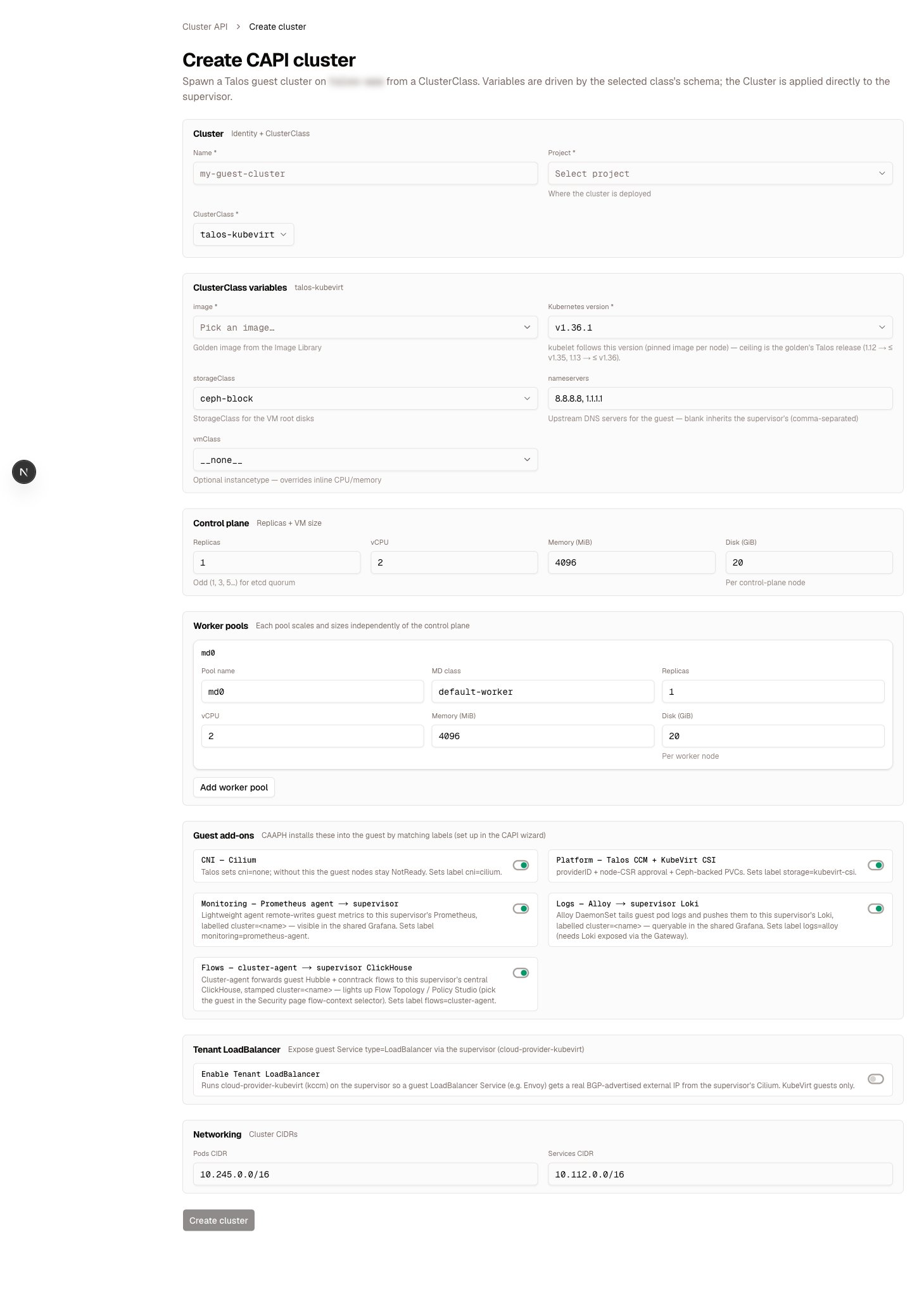
/s/<supervisor>/clusters/create-capi — spawn a cluster from a ClusterClass whose fields are driven by the class’s own variable schema; applied directly to the supervisor.Template wizard
1
Select a template
Choose from the templates available for the supervisor.
2
Name the cluster
Provide a cluster name (a DNS label, max 63 chars) and namespace.
3
Fill variables
Set the template’s variables. Known types (storage class, Kubernetes version, etc.) are offered as supervisor-aware dropdowns.
4
Define workers
Set control-plane replicas (an odd number for etcd quorum) and one or more worker groups.
5
Review & create
Preview the generated configuration, then confirm to create the cluster.
Template variables
Templates are rendered with Go templating ({{.VariableName}}). Every template can use these built-in variables without declaring them:
ClusterNameSupervisorSupervisorServerUrlSupervisorNamespaceNamespaceSourceRepoKubernetesVersionClusterClass
StorageClassControlPlaneReplicasControlPlaneVmClassEnvironmentDomainPodsCIDRServicesCIDRServiceDomain
name, label, default, and description, and surfaced as form fields in the wizard.
What you configure
Whichever flow you use, a cluster is described by fields such as:
Talos-based classes additionally take an image (golden PVC or VM template) and VM sizing.
Preview and create
Both the standard and template flows generate the cluster configuration and show it to you before anything is created:1
Preview
Celum renders the full set of configuration files for the cluster and lists them for review. Nothing is created yet.
2
Confirm
On confirm, the cluster is created on the supervisor and appears in the cluster list.
Leave the pod and service CIDRs blank and Celum allocates free, non-overlapping subnets automatically — checked against the supervisor and every existing cluster. An explicit CIDR that overlaps an existing cluster is rejected outright; pick another range or leave the field blank. A
StorageClass must also resolve at creation time — from a template variable, the infrastructure fields, or an explicit value.Verify it worked
The new cluster appears at/s/<supervisor>/clusters. Watch it move through its Cluster API phase (Provisioning → Provisioned) and its control-plane and worker replica counts converge on the desired numbers. Open the cluster to see its nodes, API server endpoint, and the pod/service CIDRs that were actually assigned. From here, Day-2 operations covers everything the detail page reads, and Access & credentials covers downloading its kubeconfig.
What commonly goes wrong
Providers
Templates carry a provider (generic, tanzu, or talos), and Celum auto-detects a cluster’s provider from its Cluster API infrastructureRef. vSphere (VKS/TKGs) and CloudStack are tested; other CAPI providers are compatible.
Celum AI can walk this flow’s inputs with you —
list_cluster_templates and get_cluster_template show the available blueprints and their variables, and get_guest_cluster reads a created cluster back in the same spec shape.Related
Clusters overview
The four cluster models and the CAPI engine behind this flow.
Templates & addons
Authoring the templates this wizard consumes — render, preview, apply modes.
Troubleshooting
The triage ladder when a new cluster misbehaves.
Supervisors & clusters
What a supervisor is and what Celum reads from each cluster.
Permissions reference
Every
cluster:* action and the KRN it is checked against.Projects
The namespace + address-space abstraction clusters are placed into.