
VM identity pools carry a live-migration capable badge and have their own page — see VM identity pools.
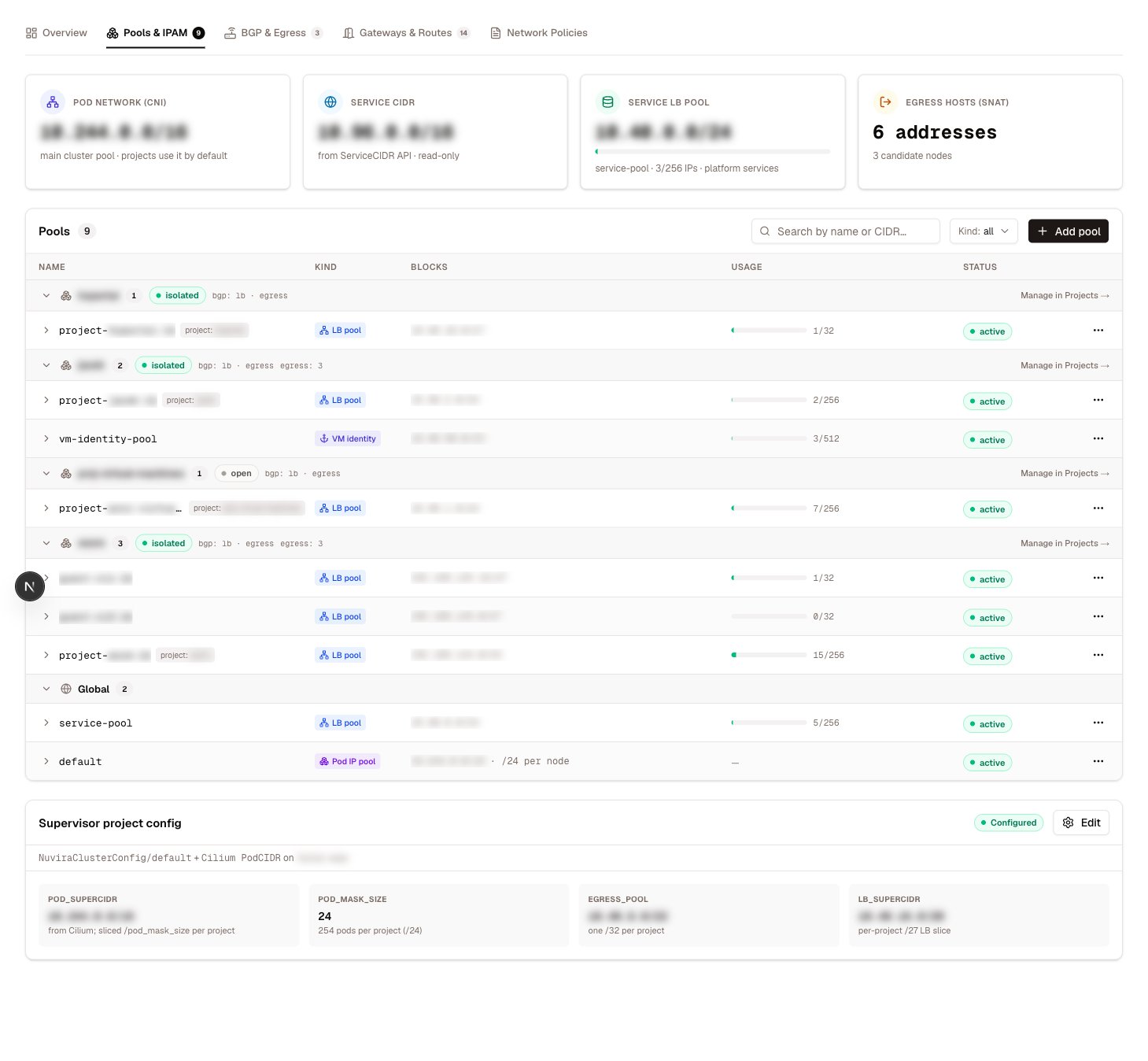
LoadBalancer pools
A LoadBalancer pool defines the addresses Cilium’s LB-IPAM may assign to Services. Create one with Add pool and fill in:Disabled is the safe way to drain a pool: Services that already hold an address keep it, while new Services are steered to other pools. Deleting the pool instead would strip addresses from live Services.
Utilization and conflicts
Each pool row shows live numbers read from the pool’s own status conditions — total, used, and available addresses — rendered as a usage bar. A freshly created/27 pool carrying one Service reads 32 total · 1 used · 31 available; the bar turns from healthy to warning as the pool fills.
The same conditions surface pool conflicts: when two pools overlap, Cilium marks the newer one conflicting and stops allocating from it. A conflicting pool is flagged in the table; fix the overlap rather than working around it, because a conflicted pool silently serves nothing.
Project and tenant pools
Pools created by a project — its LoadBalancer slice, carved from the supervisor’s addressing plan — appear in the same table, grouped under the owning project. Tenant clusters get a pool of their own too, with a service selector that scopes it to that cluster’s published services. Both kinds are managed through their owning lifecycle — edit the project or cluster, not the pool object. Project networking explains how the slices are carved and what else a project provisions.Pod IP pools
Pod IP pools give different workloads addresses from different ranges — multi-tenant pod networking, per-pool masquerade control, or per-pool BGP advertisement. A pool defines:
Cilium picks a pool for a pod in this order:
1
Pod annotation
An explicit
ipam.cilium.io/ip-pool=<pool> annotation on the pod wins outright.2
Selectors
Otherwise the pod is matched against each pool’s pod and namespace selectors.
3
Default pool
Otherwise the pool named
default serves it.Allocation views
Two views below the pool table answer “who holds what”. IP allocations assembles the supervisor’s full address picture:
Owner resolution goes one step past the Service: an address held by the supervisor-side mirror of a tenant cluster’s Service is attributed to that tenant cluster, not to the mirror object. This is the view to check before shrinking any pool.
Project allocations rolls the same data up per project — its LoadBalancer range, its egress IP, which prefix kinds it advertises over BGP (pod, LoadBalancer, egress), its egress routing mode, and its default isolation policy. It answers “what does this project’s network footprint look like” in one row; the intent behind each column is set on the project itself — see Project networking.
Looking up an IP
Any single address can be resolved to its owner: a Service, a pod, a VM, a node, or an infrastructure interface. The answer includes what kind of thing holds it and a plain description — “Kubernetes Service (LoadBalancer)” — and, for infrastructure interfaces, the subnet and VLAN the address belongs to. Use it when an unfamiliar address turns up in a flow log or a firewall rule and you need to know what it is before acting on it.Permissions
Both are scoped to
krn:vks:supervisor:<supervisor>:cilium:*.
Related
VM identity pools
The third pool kind — addresses that survive live migration.
BGP & Egress
How pool prefixes get advertised to the fabric.
Project networking
Where a project’s LoadBalancer slice and egress IPs come from.
Networking overview
The engine model behind this page.