
Container registries are not here. They were moved out to their own page because a registry carries credentials and a chart/image role that the rest of the platform resolves per supervisor — see Registries.
Kubeconfigs
The list of supervisors Celum can reach. A supervisor is a kubeconfig uploaded here and kept in Celum’s database; nothing else adds one. Each row can be checked, downloaded, toggled active, and deleted. A row also carries the site it belongs to and, when it serves web endpoints, a subdomain plus the domain those endpoints hang off — which is what makes the two tabs below more than catalogues. The full walk-through is on Register a supervisor.Domains
A DNS domain the platform may issue certificates under and publish services on. A domain is a name and a description; the binding that matters is on the supervisor, which points at one domain and adds its own subdomain. That binding has one visible consequence worth stating: Settings → SSO can generate the complete list of Grafana redirect URIs Dex must allow, one per supervisor that has a domain attached. Supervisors without a domain are reported back separately — not silently skipped — because a missing redirect URI shows up much later as a login that fails only for that cluster. The same tab registers DNS providers: the DNS servers (PowerDNS and the other external-dns backends) that a supervisor’s DNS Publishing step can bind to. A registered provider keeps its key in the secret store, and a supervisor that binds to it gets read access to that one path rather than a copy; binding needsdnsprovider:Use on the provider.
vCenters
vCenters registered once for the platform: server, user, password (kept in the secret store) and the pinned TLS thumbprint. The Cluster API step’s vSphere kind and a migration source both pick a registered vCenter instead of typing credentials, and using one needsvcenter:Use on it. When a vCenter’s certificate is renewed it is re-pinned here, once, for everything that uses it.
Sites
A site is a managed location —waw, internal, whatever your estate calls them. The catalogue backs the picker during onboarding, and the name you choose is stored verbatim on the supervisor’s kubeconfig row.
That verbatim storage is the thing to be careful with: the site name also drives image-library S3 bucket inheritance, so two spellings of the same place become two places, and an image library will inherit from neither.
SSO
The secrets of Grafana’s OIDC clients, set once here so every supervisor’s Monitoring step can turn Grafana SSO on without asking for them again:- Platform
grafanaclient secret — the platform identity provider’s owngrafanaclient, used by the Monitoring step’s Platform client mode. On an appliance it is created at install and this value is seeded with it. - Dex
grafanaclient secret — the staticgrafanaclient of the Dex broker, used by the Dex broker mode.
redirectURIs of the grafana static client in your Dex configuration, then redeploy Dex with the new configuration.
AI Assistant
Which LLM backs the in-app assistant. Providers are keyed by id —anthropic, openai, ollama — each with enabled, an API key, an optional base URL and a model; one of them is the defaultProvider.
baseUrl is required for Ollama and optional for OpenAI-compatible endpoints, which is how a self-hosted model is pointed at. The API key is masked on read and the mask is honoured on write: saving the form without retyping the key keeps the stored one, the same convention registry passwords use.
What the assistant can then do is a separate question, answered on Celum AI and MCP.
Database backup
The control plane’s own PostgreSQL — audit log, IAM policies, templates, API tokens, supervisor rows. Not any supervisor’s data. Export streams a plain-SQLpg_dump with DROP … IF EXISTS guards, so the same file restores through Import. Restore runs in a single transaction with ON_ERROR_STOP, which is the property that matters: a bad file leaves the database as it was rather than half-replaced.
Import works without a licence, even while Celum is read-only. The database carries the installation ID and the licence, so a replacement installation restored from its predecessor’s backup gets both back and needs no new licence. Import also brings an older backup’s schema up to date before Celum reads the licence again.
Licence
What this installation is licensed for, and where a new licence goes in. The tab shows:- the installation ID a licence must be issued for;
- the installed licence, its tier and customer;
- when it ends, or when the current state ends.
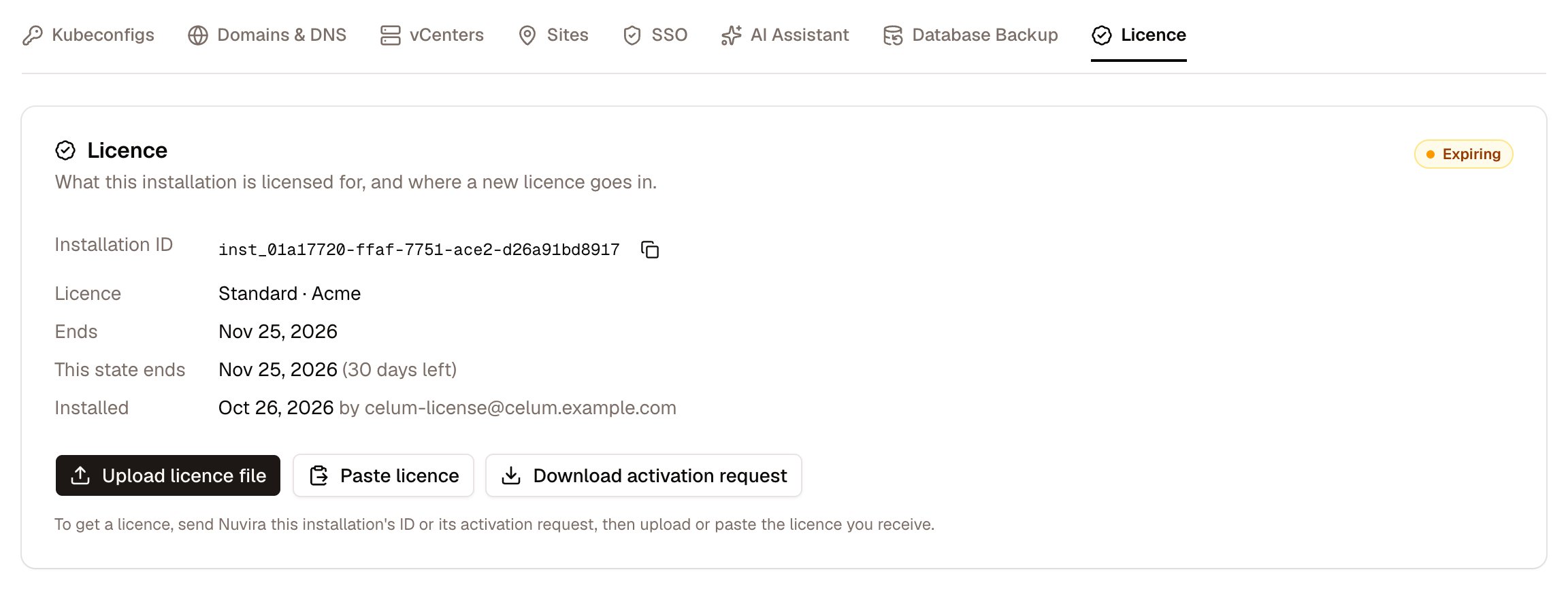
Settings → Licence with a licence installed, 30 days before it ends
- issued for another installation;
- signed by a key this release does not trust;
- already past its end.
LICENSE_ENFORCED=true). Every installation is fully usable for 30 days from its first start. After that, without a licence, or once a licence and its grace period have ended, Celum is read-only: changes answer 402, and everything can still be viewed. Celum deployed outside the appliance only logs what a licence would refuse.
Deploy the appliance → Activate Celum walks through activation from start to finish.
API tokens
A token authenticates a headless client — a script, a CI job, an MCP client — as you. There are two ways to get one, and they are deliberately different.
Celum stores a SHA-256 hash and a short prefix, never the token: it is shown once, at creation. A token may carry an expiry in days; without one it lasts until revoked. Each row records when it was last used, which is how a forgotten integration is found.
Global overrides without a UI
Two fields on the settings object have no tab:componentOverrides, which pins a specific image coordinate for a single component, and chartOverrides, which forces a chart to upstream or internal regardless of the registry defaults. They lost their screen when the registry settings tab moved out and remain an API-only surface on PUT /api/settings.
Before reaching for chartOverrides, read how a chart source is actually resolved: the decision is made per supervisor, and a supervisor’s own declaration beats a global flag. See Charts & the mirror.
PUT /api/settings merges at the top level: a key you omit is left alone, a key you send replaces that whole sub-object. Sending ai with one provider therefore removes the others. Read the current settings, edit, and send the complete sub-object back.- UI
- API
- MCP
/settings — Kubeconfigs, Domains & DNS, vCenters, Sites, SSO, AI Assistant, Database Backup, Licence. API tokens are on /iam/me.
Permissions
Export and import share one action. There is no read-only backup permission: being able to take a full copy of the control-plane database and being able to overwrite it are treated as the same level of trust.
What commonly goes wrong
Related
Audit log
The record of every change made here and everywhere else.
Register a supervisor
The Kubeconfigs tab, walked through end to end.
Registries
Where charts and images come from — moved out of Settings on purpose.
Authentication & IAM
Sessions, groups and how a token’s frozen groups are evaluated.