
What this changes on your cluster
ACiliumNetworkPolicy in a namespace, and — the whole point — traffic that was flowing may stop flowing. This is the most consequential page in this sequence, which is why the product makes a dry-run available and this page treats it as mandatory.
Before you start
- Flow Telemetry, from onboarding. Without observed traffic a dry-run has nothing to check your draft against, and degrades to an advisory.
- Permission
security:Readfor the dry-run andsecurity:Writeto apply. They are deliberately different: anyone may ask “what would this do”.
The shape of it
Draft → dry-run → read the warnings → apply → verify coverage. Skipping the middle two is the entire risk.Step 1 — Draft it against what you saw
Start from the graph, not from an architecture diagram. The topology view’spolicy filter answers the reverse question — which edges a policy covers — so you can iterate between the two.
Topology’s author mode builds the draft from the graph: the edges you pick go into the Policy cart.
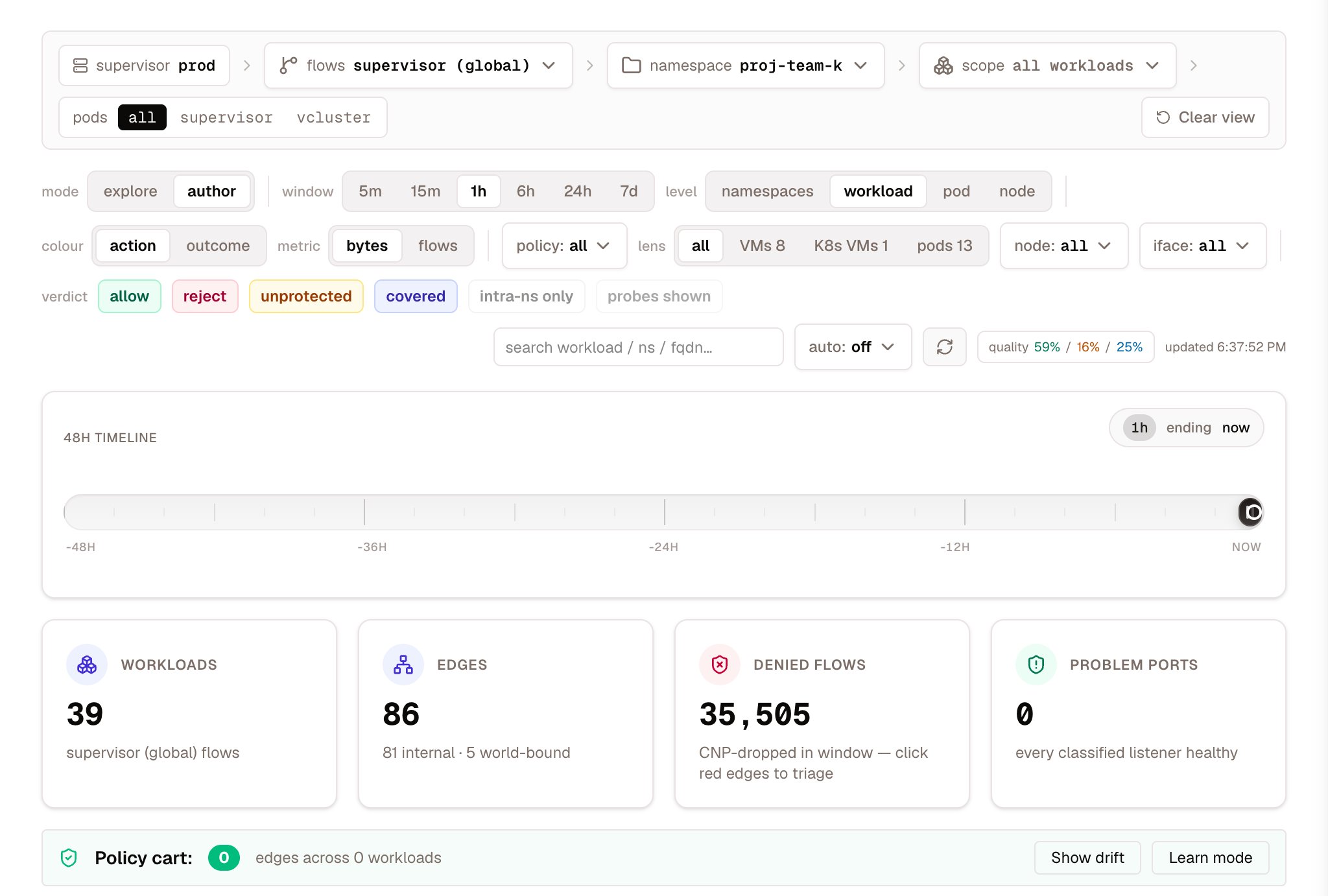
Topology in author mode, with an empty Policy cart
Step 2 — Dry-run it
- Dashboard
- API
- MCP
Security → Network Policies, or Topology in author mode for namespace-scoped authoring; Policy Studio’s old address leads there. The dry-run runs before the apply button means anything.
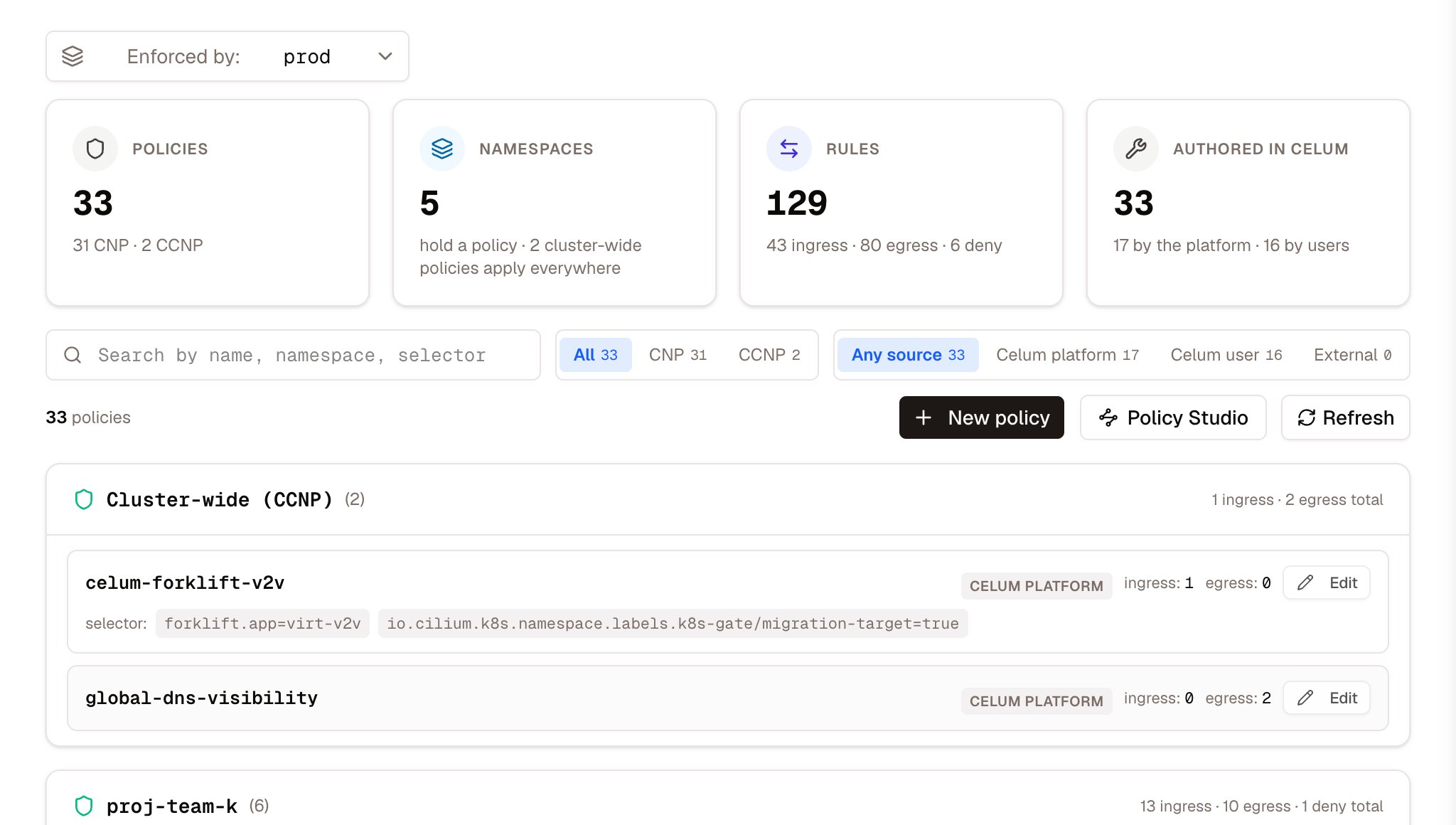
Security → Network Policies: every policy the supervisor enforces, grouped by namespace, with who authored it
wouldBlock is kept separate from wouldDeny on purpose: a deny rule takes away access something else granted, which is categorically different from an allow-list simply not covering an edge.
Step 3 — Read the warnings, especially these two
The dry-run also returns warnings, eachdanger or warn. Two of them catch mistakes that are almost impossible to see by reading the YAML.
“Selects the entire namespace” — an empty endpointSelector: {} default-denies the whole namespace, not just the workload you had in mind. It escalates from warn to danger when critical infrastructure is in scope, because KubeVirt VMs and CAPI guest nodes silently lose bootstrap traffic. The fix it names: scope the selector to specific pods, or add explicit allows for in-cluster and node traffic (fromEntities: cluster, host, remote-node).
“This policy restricts nothing yet” — the counter-intuitive one. Cilium unions allow-lists. If a blanket rule already allows every endpoint in the namespace, applying a tighter-looking policy beside it refuses nothing at all; it merely turns L7 parsing on for the ports it names. The draft looks restrictive and is inert until the blanket rule is narrowed, which is a replace, not an addition.
The other two are simpler: an HTTP rule Cilium would reject (danger — the policy would not do what it says) and L7 verdicts unavailable (warn — the L7 half of the analysis could not run).
Step 4 — Apply
- Dashboard
- API
- MCP
Apply from the same screen that showed you the dry-run.
Inside a guest cluster, the blast radius is larger
A guest gets its own dry-run — identities from the guest’s own API server, observed edges from the supervisor’s flow store filtered on the guest’s cluster label.Verify
Read the coverage map and confirm the edges you meant to protect now show as covered. Expect some that are protected to not show as covered — that is not a failure of your policy, it is one of the coverage map’s structural blind spots, and See what is talking to what lists all three. The short version: a workload with no recognised name label is not indexed, and a plainnetworking.k8s.io/v1 NetworkPolicy is not counted even though Cilium enforces it.
The stronger check is behavioural. Watch the traffic graph over a window that spans the apply: edges that changed verdict are the policy working, and edges that disappeared are worth explaining before you move on.
If you need to undo it
DELETE /api/supervisors/{name}/security/policies removes it, under the same security:Write.
Deleting a policy restores whatever the surrounding policies allow — which, because allow-lists union, may be more than you expect and may be nothing at all if a default-deny remains.
What commonly goes wrong
Next
Network policies
Per-policy detail, drift detection, and the coverage model in full.
Forensics
Who reached a service, and where a workload phones home.
Permissions model
The other kind of policy — who may do this at all.
Projects
Namespace-level isolation, which a new project gets by default.