
What this changes on your cluster
A namespace, and the Cilium objects for whichever slices you asked for: aCiliumPodIPPool, a CiliumLoadBalancerIPPool, one or more CiliumEgressGatewayPolicy objects, a CiliumNetworkPolicy when isolation is on, and a Service that advertises the egress address. An isolated project also gets a gateway of its own by default: Gateway <name>-envoy and its EnvoyProxy, with a VIP from the project’s LB pool.
No row is written to Celum’s database. A project lives entirely in Kubernetes, which is why the supervisor is also where its address book is read from: the set of taken CIDRs is computed from the live cluster on every create, not from a ledger that could drift.
Before you start
- An onboarded supervisor. Cilium must be running; the objects above are all Cilium CRDs.
- The supervisor’s pool config must be seeded. Without it
POSTanswers 412 — “supervisor pool config not set — configure pod supercidr (Cilium) + egress pool (NuviraClusterConfig) first”. This is the supervisor-wide address plan every project is carved from, and it is set once per supervisor. - Permissions:
project:GetConfigto read the plan,project:Listto see what is taken,project:Createto make one. All are scopedsupervisor:<name>:project:*.
The shape of it
Read what is free → pick the slices → create → verify it took. The first and last steps are the ones people skip, and both failure modes are quiet.Step 1 — Read the address plan and what is already taken
- Dashboard
- API
- MCP
Projects → Create project. The form reads both for you and offers the next free slice.
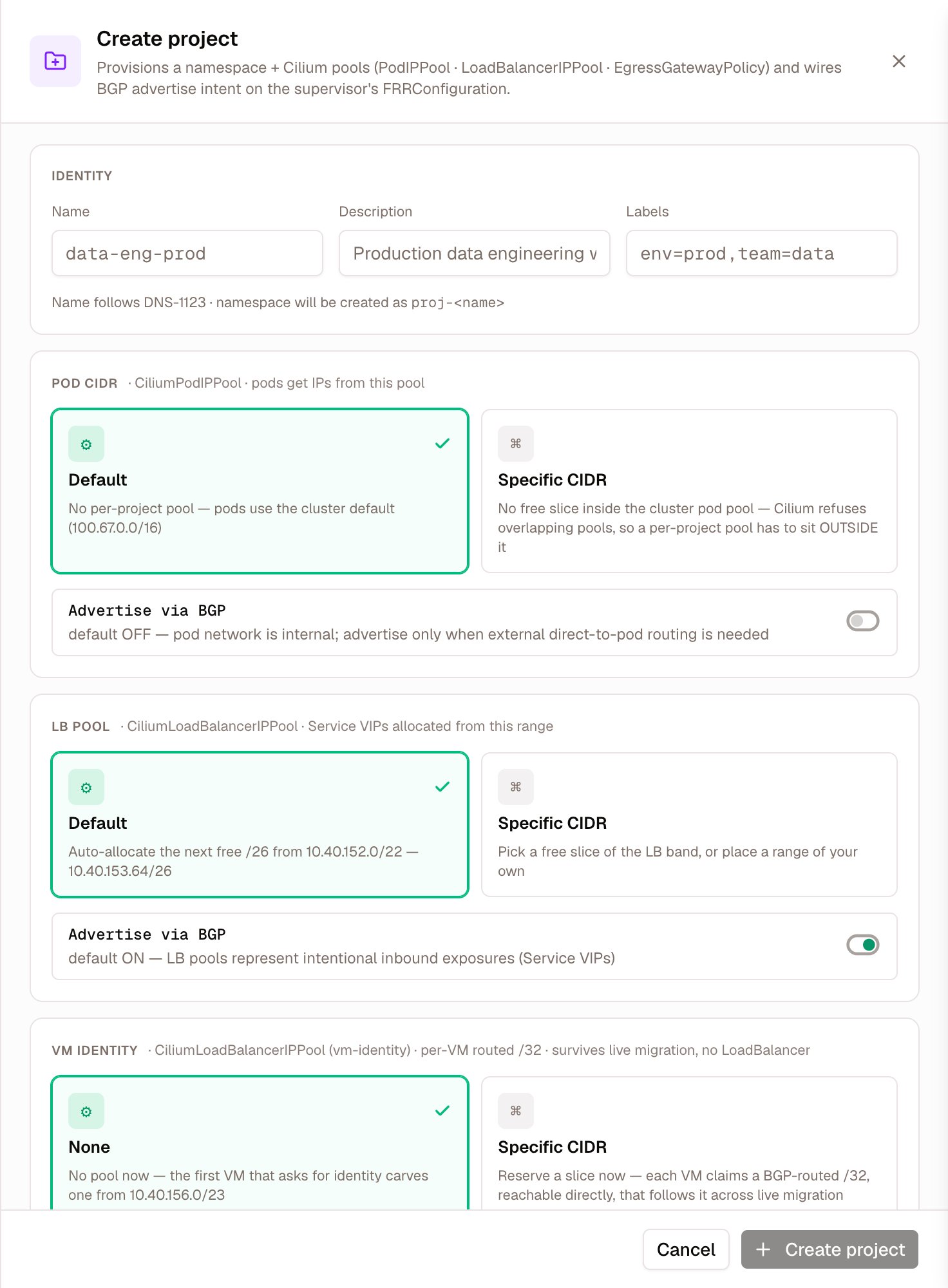
Create project: each slice offers its default or a range of your own, and says where the default comes from
seeded: true, and a list of existing projects with their podCidr, lbCidr and egressIp. Those are the ranges you must not pick.
Step 2 — Choose the slices, and know what empty means
Five decisions, and an empty value does not mean the same thing for each of them. An empty pod CIDR or egress address inherits: nothing is created for the project. An empty LB range gets the next free slice of the LB band. An empty VM-identity range is decided later, when the first VM asks for an identity address. Read the second column before you leave a field empty.Empty used to mean auto-allocate for the pod CIDR too. That changed on 2026-05-25: every project carved a pod slice whether it needed one or not, and the pod supercidr ran out after 256 projects. The LB slice kept the old behaviour, so every project created without
lbCidr takes a slice of the LB band. When the band has no free slice left, the create is refused with 409.defaultIsolationPolicy— a new project is isolated unless you opt out. It creates a default-denyCiliumNetworkPolicyin the namespace.observabilityEgress— whether that isolation policy opens egress to the monitoring endpoints. It is only meaningful when isolation is on, since with no policy there is nothing to gate. Turning it off silently breaks every guest agent’s metrics and log shipping, which surfaces later as an empty dashboard rather than as an error here.dedicatedGateway(Dedicated Envoy in the form) — omitted, it follows isolation: an isolated project gets an Envoy gateway of its own wherever the supervisor can run one, and a line inwarningswhere it cannot.falsekeeps the project on the shared gateway;trueis refused with 409 where it cannot work. See Projects → Dedicated Envoy.
kamajiCPAccess (Kamaji control planes), defaults to off; creating a Kamaji cluster in the project turns it on.
The isolation policy is create-once. Re-applying a project never rewrites an existing one, so edits made in Policy Studio survive. To reset it to the default, toggle isolation off and on again. Changing
observabilityEgress or dedicatedGateway later rewrites it too, and those edits are lost.Step 3 — Create it
- Dashboard
- API
- MCP
Projects → Create project, fill the form, and confirm with Create project at its foot.
^[a-z0-9][a-z0-9-]{0,40}[a-z0-9]$ — because it becomes a namespace.
Three refusals, each meaning something different:
That last one is worth expecting rather than treating as an error. The taken-set is read live, so two people creating projects at the same moment can collide. Celum’s own end-to-end suite treats a 400 here as “re-read the plan and pick the next free slice”, and retries twice before giving up. Do the same.
Result:
201, and the project appears in the list.
Verify
Three checks, in this order. Each one catches something the previous cannot. The namespace isproj-<name>, not <name>. Read it off the project rather than constructing it — this is the first thing Celum’s own test run got wrong on live infrastructure.
The allocation that came back is the allocation you asked for. Compare podCidr, lbCidr and egressIp on the created project against what you sent. A mismatch means a re-pick happened somewhere.
The profile actually took. isolationPolicyPresent is the actual state and defaultIsolationPolicy is the desired one — they are separate fields precisely because they can disagree. With egressNodeCount set, check that the expected number of egress IPs exists, one per candidate node.
- API
- MCP
GET /api/supervisors/{name}/projects/{project} returns all of it, including egressNodes with per-node assignments.kubectl get ciliumpodippools,ciliumloadbalancerippools lists the project’s pools with the ranges Celum returned. The address plan (GET /api/supervisors/{name}/networking/address-plan, MCP get_address_plan) shows them as taken. A project that looks right in Celum and is absent from the cluster is a real failure, and only a second path can see it.
If you need to undo it
Deleting a project deletes its namespace and everything in it. It is also the one operation here with no MCP tool: removing a project requires a person. Delete is not always immediate, and the responses say which case you are in:
Afterwards, confirm the allocation was released: the project’s pools are gone from
kubectl get ciliumpodippools,ciliumloadbalancerippools, and the address plan offers the range again. A deleted project that leaks its subnet blocks whoever asks for that range next.
What commonly goes wrong
Next
Projects
What a project is, and how its address space is modelled.
Project networking
The objects behind the slices, and how egress identity works.
Create a VM
The first thing most teams put in a new project.
Create a cluster
Tenant clusters live in a project namespace.