
What this changes on your cluster
AVirtualMachineInstanceMigration object, and then the VM’s node. Nothing about the VM’s definition changes — not its disks, not its address, not its name. Migration is the one operation here that alters where something runs without altering what it is.
Before you start
The VM must be migratable, and that was decided when it was created. Celum reports it asmigratable, derived from the VM’s eviction strategy: LiveMigrate means yes, anything else means no.
Two create-time choices put a VM on the wrong side of that line:
- a ReadWriteOnce image — the disk cannot be attached on two nodes at once, so the VM cannot move;
networkMode: bridge— which deliberately clears the eviction strategy, because an eviction strategy on a VM that cannot migrate would wedge a node drain.
vm:Migrate, scoped supervisor:<name>:vm:<vm>.
The shape of it
Check it can move → start it → let the address follow → prove the session survived. The last step is the only one that distinguishes a live migration from a fast restart.Step 1 — Start the migration
- Dashboard
- API
- MCP
The VM detail page → ⋯ (More actions) → Live migrate. It starts at once, with no confirmation, and leaves the destination to the scheduler; pin a node through the API.
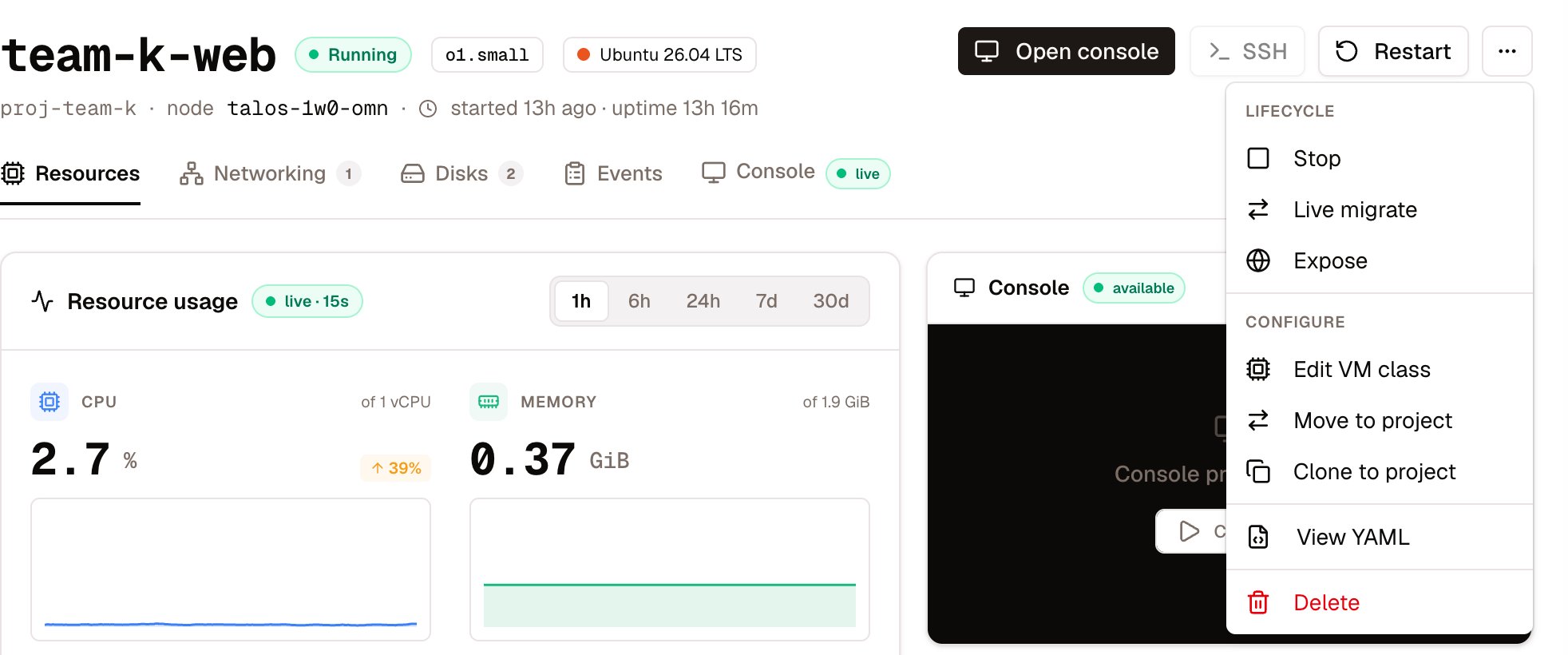
Live migrate is in the VM's More actions menu
A named
targetNode is validated before it is used. A value that is not a real node on this supervisor is refused with 400 targetNode "…" is not a node on this supervisor. That check exists because an invalid node selector does not fail loudly: KubeVirt floods the namespace with “Error creating pod … invalid nodeSelector” warnings while the migration simply never starts. Pinning a target is worth doing when you are draining a specific host, and pointless otherwise.200 {"status": "migrating", "migration": "<vm>-migration-…"}. The migration is running, not finished.
Step 2 — What happens to the address
If the VM has an identity address, the claim has to move at exactly the right instant, and the interesting part is that both obvious moments are wrong:
The signal Celum actually uses is
targetNodeDomainReadyTimestamp on the VMI, stamped the second the guest resumes on the target. It is the only moment that is neither early nor late.
Verify — the session, not the VM
That the VM is Running on a new host proves almost nothing; a restart would look the same from a distance. Celum’s own end-to-end suite moves every VM onto every schedulable host and then asks four questions of a connection that was open the whole time:- Exactly one distinct connection was used for the heartbeat. Two means it was re-established.
- The connection id did not change. A different id is a new session wearing the old one’s name.
- No gap longer than 15 s. A longer stall is a migration that technically succeeded and practically dropped the app.
- The sequence advanced. This is the one people leave out: without it you have proved the session survived idle, not that it kept working through every hop.
Reading a migration that has not landed
POST …/migrate answers 200 when the migration object was created. That says nothing about whether the VM moved, and for a long time there was no way to ask: the only options were polling the VM list until its node changed, or a timeout — and a timeout reports the same way whatever caused it.
GET /api/supervisors/{name}/vms/{vm}/migrate is that read. Most of it echoes objects you could fetch yourself — phase, source and target node, the target pod, timestamps, inFlight, elapsedSeconds, and the history of every earlier hop. One field does not:
blocked is why this endpoint exists. A migration that cannot be scheduled emits no VMI event at all, so the phase Scheduling looks identical one second in and twenty minutes in. The scheduler’s own sentence lives on the target pod’s PodScheduled condition, and the migration state names that pod, so the lookup is exact rather than guessed from the VM’s name.It usually reads something like 0/N nodes are available: N Insufficient memory — because the guest’s full RAM must be free on the target while the source still holds its copy. That is the failure most often misread as a storage problem. It was investigated twice this year and both times the search started on the storage side.elapsedSeconds is there to be compared against KubeVirt’s completionTimeoutPerGiB, 150 s by default: a migration well inside that window is slow, not stuck.
pinnedTo sits beside targetNode deliberately. One is what the caller asked for and the other is where KubeVirt went; they differ exactly when a pin was not honoured.
Cancelling, and the migration that blocks all the others
DELETE /api/supervisors/{name}/vms/{vm}/migrate aborts an in-flight migration; the VM stays where it is.
If a VM refuses to migrate and nothing looks wrong, check for a leftover migration object before checking anything else.
What commonly goes wrong
Next
VM lifecycle
The rest of the verbs — start, stop, resize, snapshot, clone, move between projects.
VM identity pools
The addresses that follow a VM, and how to re-address a stale claim.
Infrastructure & nodes
The hosts you are migrating between, and what each has left.
Troubleshooting clusters
When the problem turns out to be the node rather than the VM.