
What this changes on your cluster
Depends entirely on which path you take, and that is the decision this page is about:
The Gateway path shares one address across every hostname published through it. The LoadBalancer path gives each publication its own. Neither is wrong — but on an estate where addresses are a finite, planned resource, the difference compounds.
Before you start
- Certificates, from onboarding — cert-manager plus a ClusterIssuer. Without one the Gateway path publishes without TLS, which is the outcome it exists to avoid.
- A domain on the supervisor. Hostnames derive from it; this is the field set back on Register a supervisor.
- DNS Publishing, if you want the A record created for you. Without it the route works and nothing resolves — publish the name yourself, or install external-dns.
- Permission
vm:Exposefor a VM port, orgateway:Createfor a platform route.
The shape of it
Pick the path → name the hostname → publish → prove it from outside. The last step is the one that catches a missing DNS record, which is otherwise invisible from inside the cluster.Step 1 — Choose LoadBalancer or Gateway
Take the Gateway when the thing speaks HTTP. You get TLS terminated by cert-manager, an HTTP→HTTPS redirect, and no address consumed. This is the same mechanism the platform uses to publish Grafana and Prometheus. Take the LoadBalancer when it does not. Gateway exposure is HTTP/TCP-shaped only; a non-TCP protocol is refused outright, and raw TCP — SSH, RDP — is explicitly not implemented: “raw TCP via TCPRoute/TLSRoute is not implemented yet”. Those need the LoadBalancer path and an address of their own.- Dashboard
- API
- MCP
The VM detail page → Networking. Each port the guest listens on has Expose, which publishes it on the VM’s LoadBalancer, and Gateway, which opens a form naming the Gateway and the hostname it will use.
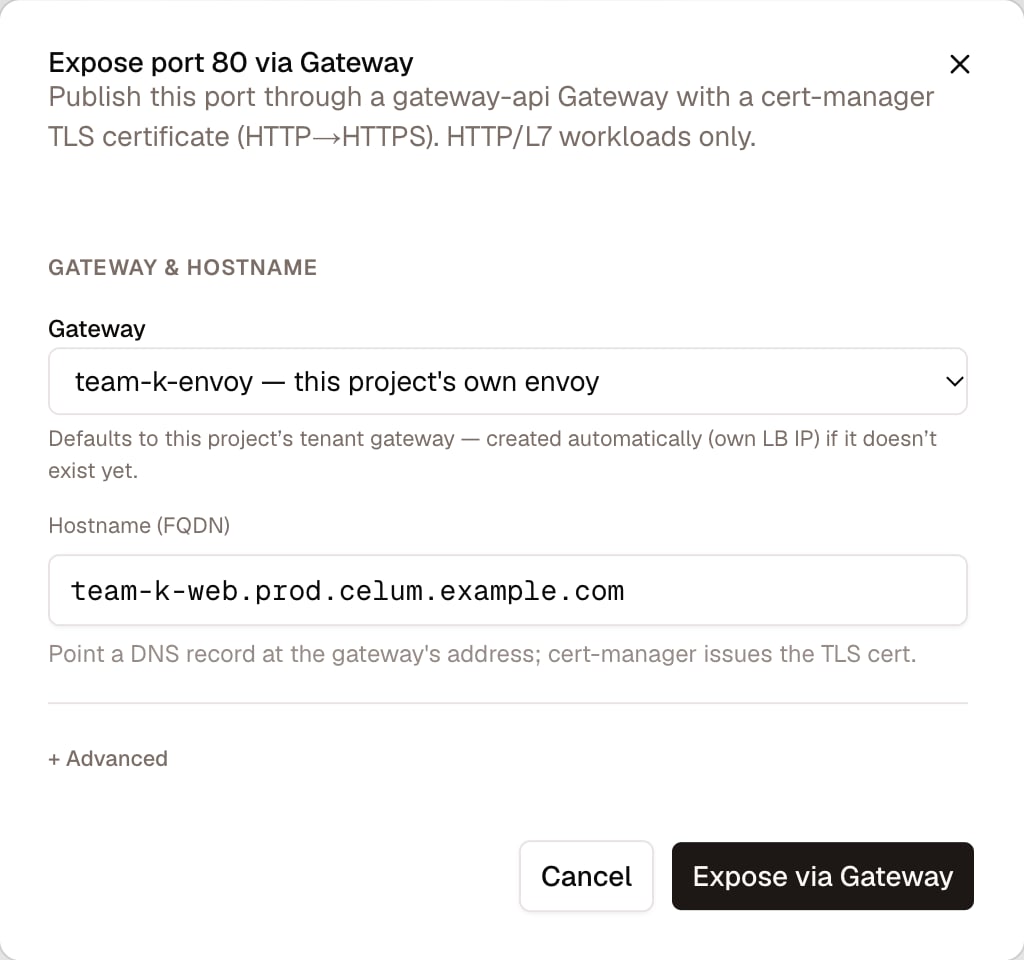
Gateway on a VM port: the Gateway it lands on and the hostname, filled in for you
Step 2 — Know which Gateway you land on
You may name one withgatewayRef as namespace/name. Leave it out and Celum resolves, in order:
- the project’s dedicated Gateway,
<project>-envoy, when the project has one (dedicatedGateway). It replacestenant-gw, and every later publication in the project lands on it; - otherwise the project’s own
tenant-gw, created if it does not exist yet; - failing that, the platform’s
shared-gateway.
Each project gateway gets its own LoadBalancer address. So the first publication in a project does consume one — and every publication after it, in that project, is free. The saving is per project, not per route.
<vm>-gw is a ClusterIP selecting vm.kubevirt.io/name=<vm>, distinct from <vm>-lb. A VM can therefore be published both ways at once without the two interfering.
Step 3 — Publish
For a VM port, send theport, the hostname as an FQDN, and optionally a clusterIssuer — it defaults to letsencrypt-prod.
For a Service that is not a VM, the platform route endpoint takes the same shape one level up: POST /api/supervisors/{name}/networking/routes with hostname, serviceName, servicePort, a gatewayRef of namespace/name, and a clusterIssuer.
Creating a Gateway of your own, rather than using one that exists, is POST .../networking/gateways: gatewayClassName defaults to cilium on a supervisor and is envoy-gateway inside a guest cluster — each surface accepts only its own class. requestedIP pins a specific address from the pool and is cilium-only; datapath (cluster or daemonset) is envoy-gateway-only.
Result: the route exists and the Gateway lists the hostname. That is not yet proof that anything answers.
Verify — from outside, not from inside
Three things have to be true, and they fail independently:- The route attached. The Gateway reports the hostname on a listener.
- The certificate was issued. A Certificate that stays Pending usually means the ClusterIssuer cannot solve DNS-01 — which is a certificates problem, not a routing one.
- The name resolves. With DNS Publishing installed this happens on its own; without it, nothing does, and the route looks perfectly healthy while being unreachable.
If you need to undo it
Both paths are reversible and neither destroys anything:unexpose_vm_port removes the LoadBalancer Service, unexpose_vm_gateway removes the HTTPRoute and its ClusterIP. Routes created at the platform level come off with DELETE .../networking/routes/{route} (gateway:Delete).
Deleting a Gateway is a wider action than deleting a route — every route still pointing at it stops working, and the shared address goes with it.
Removing a route does not necessarily remove its DNS record. Where external-dns manages the zone with policy
sync, it reconciles the deletion. With upsert-only, or where it does not manage the zone, the name keeps resolving to an address that no longer answers.What commonly goes wrong
Next
Gateways & Routes
Listeners, TLS, datapath modes, and publishing tenant APIs.
VM networking
The VM-side view, including what the guest is actually listening on.
Pools & IPAM
Where LoadBalancer addresses come from, and how full the pool is.
Security overview
Seeing who is actually reaching what you just published.